


Shopify: Sell. Run a business.
4.25.02K Reviews
App Specs
- Version
- 10.2638.0
- Updated On
- License
- Free
- Downloads
- 10,000,000+
- Developer
- Shopify Inc.
- Categories
- Business
- Platform
- Android, iOS
Screenshots


 Analysis by AppCompare
Running a shop from a phone sounds convenient until you need to read a report in a hurry, update a product with one hand, or deal with a busy sales day away from your desk. In my experience, Shopify: Sell online/in person is most useful when I treat it as a mobile control panel for an existing selling workflow, rather than expecting a small screen to replace every part of running a business. It brings store tasks into reach, but the best fit depends on how you work and what kind of help you need from the interface.
Readability and navigation on a small screen
Shopify is a business app from Shopify Inc., and its central appeal is that store management does not have to wait until I am back at a computer. The opening setup is approachable, and the app is aimed at people who want to create and manage a shop without first learning web development. I find that a useful starting point for a solo seller who wants to get products ready and keep an eye on day-to-day activity from a phone.
That convenience has a trade-off: a phone screen gives less room for long product descriptions, detailed reports, and multi-step settings than a desktop browser. I would use mobile for quick checks and focused edits, then move to a larger screen when I need to compare lots of information or carefully revise several pages. That division of labor keeps small-screen navigation from becoming a chore.
Motor and sensory considerations
For someone who prefers short, practical sessions, having store tasks on a mobile device can be easier than sitting down for a full desktop session. The app’s guided setup also reduces the need to figure out every decision at once. Still, managing a shop involves tapping through controls and reading business information, so a person who finds small targets, frequent screen changes, or dense text tiring may prefer to handle more involved work on a computer.
I would also avoid treating a phone as the only way to run a shop if distractions or sensory overload are a concern. A quiet, planned session is better for checking figures or changing important product details than trying to do it amid notifications and customer interruptions. The practical benefit is flexibility; the sensible boundary is choosing the device and moment that let you concentrate.
Getting Started with Shopify
When I first opened the app, I was pleasantly surprised by how sleek and user-friendly it is. Setting up your store is a breeze, and it guides you through the process with ease. You don’t need to be a tech wizard to get things rolling. Plus, there are tons of customizable themes to make your store uniquely yours.
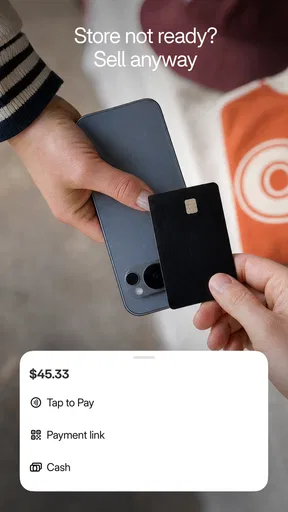
The app is designed to cater to both online and in-person sales, which is fantastic for those who want to sell at events or have a physical shop. The integration is seamless, allowing you to manage everything from one place. Talk about convenience!
Worth Reading Before You Choose

Flipboard Shows What News Apps Must Do Beyond the Feed

Switching to Android Auto Means Rethinking Your Driving Routine

Google Calendar Makes a Crowded Week Easier to Manage

Ludo King Makes the Most of the Minutes Between Plans

Baby Panda World Brings Quick Play to Modern Phones, but Its Game Library Feels Busy

ESPN’s Live Game View Makes Following Close Games Easier
Features That Stand Out
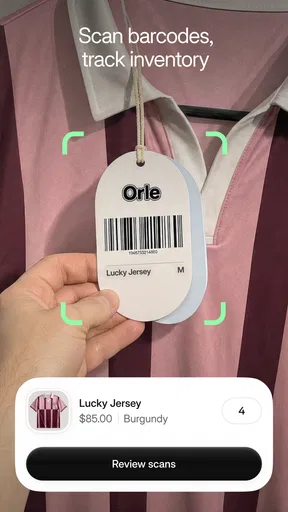
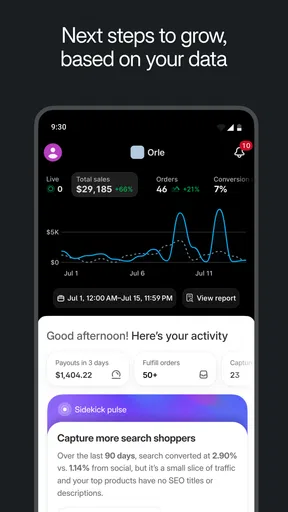
The inventory management system is top-notch. You can keep track of all your products in real time, which means no more stock surprises. And the analytics? Oh, they’re a goldmine! You can see what’s working and what’s not, helping you make better business decisions.
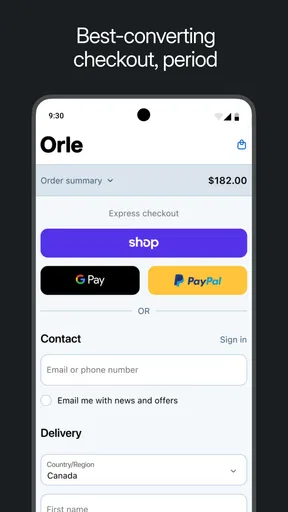
Another cool feature is the payment options. With Shopify, you can accept a variety of payment methods, making it easier for customers to purchase your products. The app supports credit cards, PayPal, and even Apple Pay, ensuring that you’re never missing out on sales.
Situational access: when mobile helps
A realistic use for the app is a seller preparing for a weekend market. Before leaving home, I would check that the products I plan to bring are represented accurately in the shop. At the event, a quick stock check can help me avoid promising an item that has already sold. Afterward, I can review activity while the details are fresh, rather than relying on memory once I am back at a desk. This is where mobile access has genuine value: it connects a physical selling moment with the store’s broader records.
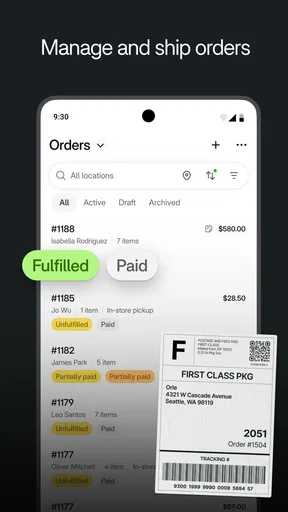
It can also suit a maker who packs orders in short gaps between other responsibilities. I would use those brief windows for a specific task—such as checking an order or confirming product availability—instead of trying to redesign the whole storefront between interruptions. A useful habit is to separate quick operational checks from higher-consequence changes. Product descriptions, prices, and other details deserve a slower review, especially when working on a small screen.
Workflows that make the app more useful
One non-obvious advantage of managing inventory and sales in the same business environment is the chance to use stock checks as a prompt for better decisions, not just as a record-keeping chore. If an item is running low, I would verify the quantity before promoting it or taking it to an event. That simple pause can prevent a mismatch between what a customer sees and what I can actually supply. For a business with many variations, such as different sizes or colors, careful product organization matters even more; mobile access cannot compensate for unclear inventory naming.
Analytics are most helpful when I ask a narrow question rather than opening them just to browse. For example, I might look for which products are attracting attention and then compare that with what is available to sell. A report is a signal for investigation, not an automatic instruction to reorder or change a listing. Keeping notes about a promotion or market day can also make later comparisons more meaningful, because a sudden change may reflect a specific event rather than a lasting customer preference.
Choosing between mobile, desktop, and simpler tools
Compared with a basic marketplace seller app, Shopify is aimed at people who want to manage their own storefront and connect online selling with in-person activity, rather than only list products within someone else’s marketplace. That broader role is useful if you want a consistent home for your business. It also means there is more to learn and maintain than with a minimal tool whose job is simply to post an item and respond to buyers.
Compared with running everything from a desktop browser, the app’s advantage is access while away from the desk; the browser remains more comfortable for long editing sessions and reviewing several details side by side. I would not choose the mobile app as the sole workspace for a complex catalog or a major store redesign. Nor is it a natural fit for someone who only occasionally sells a few used belongings and does not want to maintain a storefront. In those cases, a simpler marketplace service may involve less setup.
The app is free to install, is rated for Everyone, and has a 4.2 average from around 63,000 ratings, with more than 10 million installs. It was released in September 2014, and version 10.2549.3 lists Android 8.0 as its minimum operating system. Those details help set expectations about availability, but they do not tell me whether the workflow suits a particular shop; the complexity of your catalog and your comfort managing it on a phone matter more.
Support, learning, and realistic expectations
Now, let’s talk about support because that’s a biggie for me. The customer service team is super responsive and helpful. Whether you have a question about setting up or need troubleshooting tips, they’re just a message away. Plus, there’s a bustling community of users who share tips and tricks, making it feel like you’re part of a supportive network.
In addition, there are plenty of resources available, like video tutorials and forums, that can help you get the most out of the app. You’re never really on your own, which is reassuring.
Even with learning resources, I would plan for a settling-in period. A store has interconnected details: a product’s description, its availability, and the way a customer encounters it all need to make sense together. I find it safer to complete one small workflow, then check the result from a customer’s point of view, rather than make a large batch of changes without reviewing them. That approach is especially useful for first-time sellers, who may still be deciding how to describe products and organize stock.
Remaining barriers and who should look elsewhere
Mobile convenience does not remove the effort involved in operating a shop. Reading performance information, handling a large set of product details, and making careful edits can take concentration. Someone who needs a highly simplified interface, relies on large-screen workflows, or finds touch navigation difficult may be more comfortable doing core administration on a computer. I would also recommend comparing the overall store workflow with your needs before committing to a platform: managing a full storefront can be unnecessary if your sales are occasional and a marketplace listing already does the job.
The app’s AI-oriented store-building pitch may appeal to people who want help getting started, but I would still review every generated or suggested detail before publishing. A tool can speed up a first draft; it cannot know whether a product description is accurate, whether stock is current, or whether the wording reflects your business. That human check is not a flaw unique to this app—it is part of selling responsibly, and it becomes more important when changes are made quickly from a phone.
Overall Experience
To wrap it up, Shopify: Sell online/in person is a powerhouse for anyone looking to run a successful business. It’s flexible, reliable, and packed with features that make selling a breeze. Whether you’re a seasoned entrepreneur or just starting out, this app is definitely worth checking out. So, go ahead and give it a spin—you’ll be glad you did!
My more specific recommendation is for a seller who wants one mobile place to stay connected to online and in-person shop activity, and who is willing to use a larger screen for work that needs careful comparison. It is less compelling for casual reselling or for anyone who wants a minimal tool with almost no ongoing store management. If you are deciding whether it belongs in your routine, start by identifying the tasks you actually need on the go—stock checks, order follow-up, or quick performance reviews—and see whether those make your working day easier. That is the clearest test of whether Shopify’s mobile approach fits you.
Pros
- User-friendly interface for easy navigation.
- Comprehensive analytics to track sales.
- Seamless integration with social media.
- Wide range of customizable templates.
- 24/7 customer support available.
Cons
- Monthly fees can be expensive.
- Limited free themes available.
- Transaction fees unless using Shopify Payments.
- Complex for beginners at first.
- Customization requires coding knowledge.
FAQs for Shopify: Sell. Run a business.
What features does the Shopify app offer for selling online and in person?
The Shopify app provides a comprehensive platform for selling both online and in person. Key features include inventory management, order tracking, and customer profiles. It also supports multiple sales channels, such as social media and online marketplaces, and offers integrated payment processing for seamless transactions.
How does the Shopify app integrate with existing online stores?
Shopify seamlessly integrates with existing online stores by providing tools to import products, manage inventory, and sync sales channels. The app supports numerous third-party integrations, allowing users to connect with tools they already use, such as accounting software, email marketing, and analytics platforms, enhancing their business operations.
Is the Shopify app suitable for small businesses?
Yes, the Shopify app is ideal for small businesses due to its scalable features and pricing plans. It offers a user-friendly interface, making it easy for small business owners to manage their stores. The app provides essential tools for marketing, sales, and customer service, helping small businesses grow efficiently.
What payment methods are supported by the Shopify app?
The Shopify app supports a wide range of payment methods, including credit/debit cards, PayPal, and Shopify Payments, which allows for quick and secure transactions. Additionally, it accommodates alternative payment options like digital wallets and local payment methods, offering flexibility to meet diverse customer preferences.
How secure is the Shopify app for handling transactions and customer data?
Shopify prioritizes security by using industry-standard encryption to protect transactions and customer data. It is PCI DSS compliant, ensuring that all payment processes meet stringent security requirements. Regular updates and security patches help safeguard against vulnerabilities, making it a reliable choice for secure business operations.


